
Print once, keep full control of where your QR code sends people, now and later.
What Dynamic QR is and why people use to Pay for it
Sometimes you print a QR code on a menu, flyer, label, or package and later the link needs to change. Normally, that means reprinting everything, which costs time and money.
A dynamic QR solves this by pointing to a short link on your own website instead of a final destination. If the link ever needs to change, you simply update the destination behind that short link. The QR code itself stays the same.
This keeps you in control and avoids unnecessary reprints.
Here’s how you can create your own dynamic QR system. Once set up, you can even add Google UTM parameters later to understand traffic and audience behavior if needed without relying on third-party platforms or compromising privacy.
It’s a simple, practical approach that gives you full functionality without lock-in or recurring fees.
HOW THE DYNAMIC QR SYSTEM WORKS
When someone scans your QR code, they don’t go directly to your final page.
Instead, the QR code opens a short link hosted on your website. That short link immediately redirects the visitor to the real destination.
Because the QR points to the short link, not the final page, you can change the destination anytime without touching the printed QR code.
If the link ever needs updating, you simply edit the redirect. The QR code already printed on labels, menus, packaging, or flyers continues to work without any changes.
This is what makes dynamic QR practical for anything printed at scale.
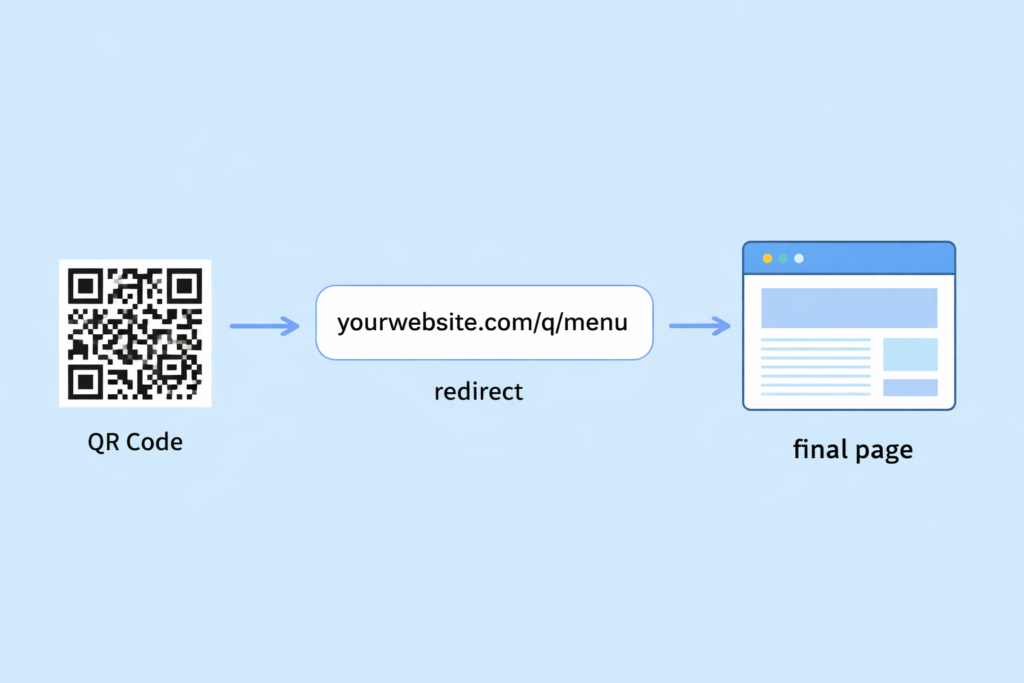
(QR → short link → redirect → final page)
The “Free Dynamic QR” Trap Most People Don’t Notice
Many platforms advertise free dynamic QR codes, but the free version is usually limited in ways that only become obvious after you’ve already printed and distributed your codes.
Common restrictions include:
- Daily scan limits
- Expiration dates
- Time-limited campaigns
- Feature lock after trial
- Forced branding
- Redirects disabled unless you upgrade
Once your QR codes are printed and in circulation, you’re locked in. If the service stops working or hits limits, you can’t recall printed materials. At that point, you’re forced to pay the provider just to keep your QR codes functional.
There’s no practical way to reverse that decision after distribution.
This is why owning your redirect on your own domain is the safest approach. You remove dependency on third-party policies and keep full control over how long your QR codes remain active.
How to make a QR code you can edit later
A self-hosted dynamic QR setup is useful for anyone who prints QR codes and needs the flexibility to update links later without starting over.
Instead of relying on third-party services, you keep control of the redirect on your own domain. That means your QR codes stay active as long as your site is running, and you can change destinations anytime without reprinting.
This approach is especially practical for people who deal with printed materials that need to stay accurate over time.
It’s commonly used by:
- Graphic designers managing print projects
- Small businesses updating menus, offers, or product info
- Print shops handling client revisions
- Event organizers sharing schedules or updates
- Teams maintaining documentation or instructions
- Anyone who wants QR codes to remain reliable long term
Self-hosting removes dependency on external platforms and gives you full control over how your QR codes behave.
How Dynamic QR Works
Instead of sending your QR code directly to a final page, you point it to a short link on your own website.
For example:
yourwebsite.com/q/menu
When someone scans the QR code, they first open that short link. The link then automatically redirects them to your actual destination page.
If the destination ever needs to change, you simply update the redirect behind the short link. The printed QR code continues to work without any changes, which is what makes dynamic QR practical for printed materials.
What You Need Before Starting
Before setting this up, make sure you have:
- Access to your website hosting
- File manager access (or cPanel / hosting dashboard)
- Your domain
You don’t need coding knowledge the setup is simple and straightforward.
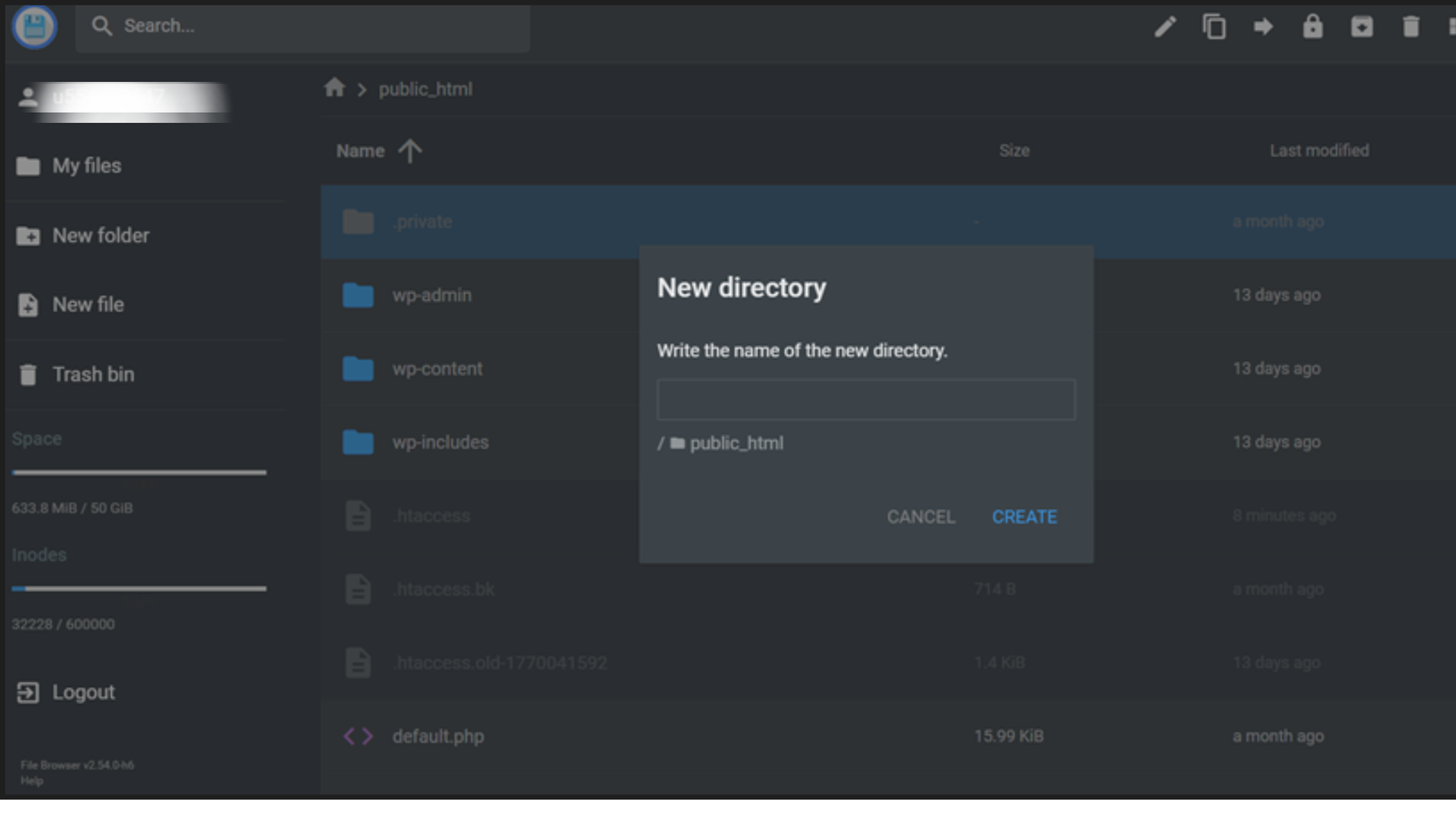
Create a Folder Called “q”
Open your hosting file manager and go to your main website directory, usually called public_html.
Create a new folder named:
q
Create a redirect file
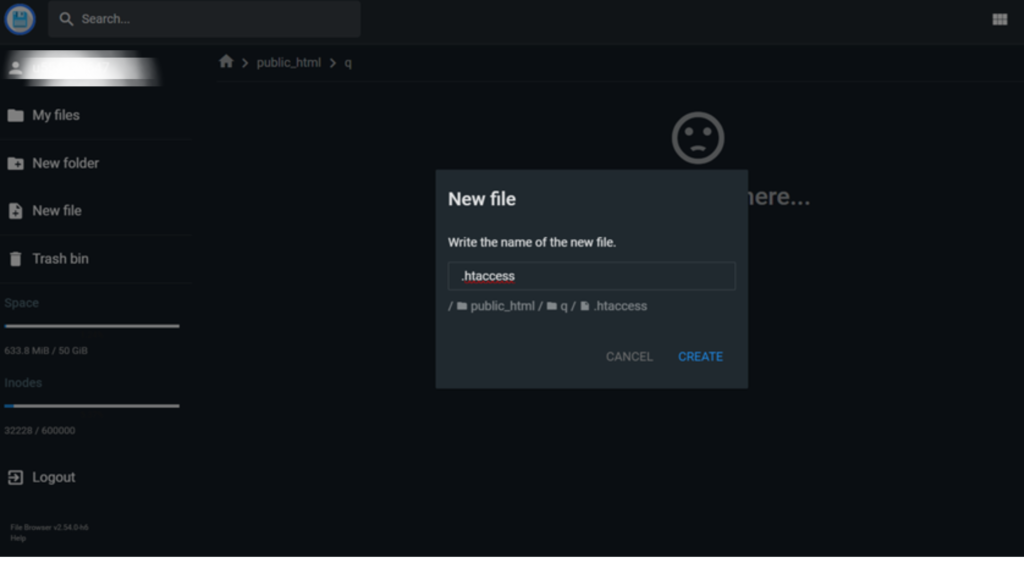
Open the q folder and create a new file named:
.htaccess
Add your redirect links
Open the file and add lines like these:
# ==========================================
# TOOLSQUE QR MANUAL REDIRECT TABLE
# ==========================================
# HOW TO USE:
# Left side = short link after /q/
# Right side = destination page
#
# Example:
# /q/menu → redirects to your menu page
#
# To change link destination, just edit URL on right side.
# ==========================================

RewriteEngine On

# ====== QR REDIRECT LIST START ======


# SAFE QR SCANNER
Redirect 302 /q/scanner https://toolsque.com/tools/safe-qr-code-scanner/

# QR GENERATOR
Redirect 302 /q/generator https://toolsque.com/free-qr-generator

# CONTACT PAGE
Redirect 302 /q/contact https://toolsque.com/contact

# PROMO PAGE
Redirect 302 /q/promo https://toolsque.com/promo

# ====== QR REDIRECT LIST END ======

# ==========================================
# NOTES:
# 302 = temporary redirect (recommended for QR)
# Change to 301 if permanent
#
# Example new link:
# Redirect 302 /q/event https://example.com/event-page
# ==========================================
Each entry connects a short link to a real page. When someone visits a short link like yourwebsite.com/q/scanner, they are immediately redirected to the destination you defined.
If you ever need to update where a QR code points, you only change the URL on the right side. The QR code already printed will continue to work without any changes.
Using this simple table keeps all your redirects organized in one place and makes future updates quick and safe.
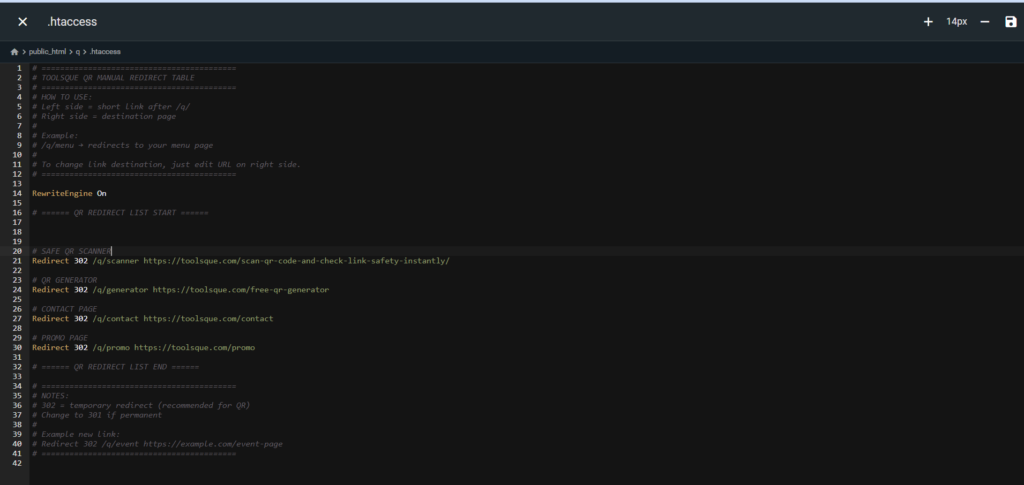
What This.htaccess File Is Doing (Simple Explanation)
The.htaccess file is acting like a routing list for your short links. It tells your server where to send visitors when they open a specific short URL.
When someone opens a link like yourwebsite.com/q/scanner, the server checks this file, finds the matching line, and immediately sends the visitor to the full destination URL you defined.
Think of it like a forwarding address list.
What “Redirect 302” Means
The number 302 tells the browser that this redirect is temporary.
This is recommended for QR codes because you might change the destination later. Search engines and browsers won’t treat the link as permanently moved, so you keep flexibility.
If you used 301, it would mean the destination is permanent.
Which Part Redirects to Which
Each line has two parts.
Left side is the short link someone visits.
Right side is the real page they get sent to.
Example:
Redirect 302 /q/scanner https://toolsque.com/tools/safe-qr-code-scanner/
This means when someone visits /q/scanner, they are sent to the full URL on the right.
What “RewriteEngine On” Does
This line tells the server to enable redirect rules in this file. Without it, the rules may not run. You only need it once at the top.
What Comments Are
Any line starting with # is just a note for humans.
The server ignores these lines completely. They are only there to help you understand or organize your redirects.
Limits of Using.htaccess
This method works well for small to medium numbers of links.
If you start managing many QR codes, the file can become harder to maintain and slightly slower to process. At that point, a database redirect system is usually a better approach.
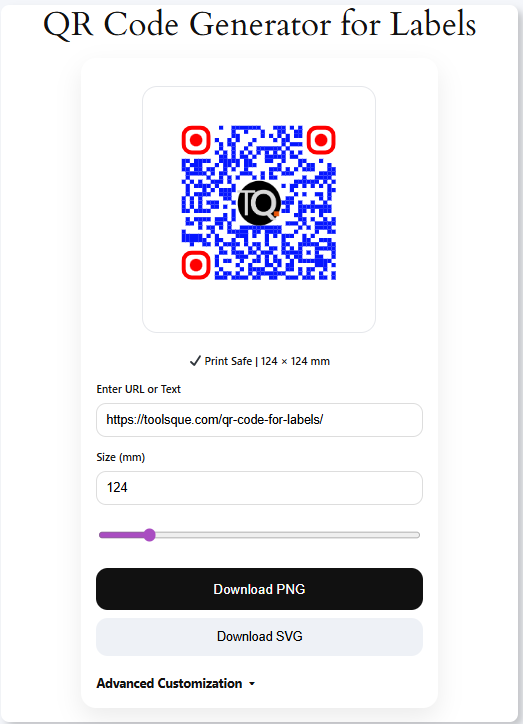
Create Your QR Code Using the Short Link
When generating your QR code with the QR code generator for labels, use your short link instead of the final destination page.
This ensures you can change where the QR code points later without needing to reprint it.
Test Your QR Code on Laptop
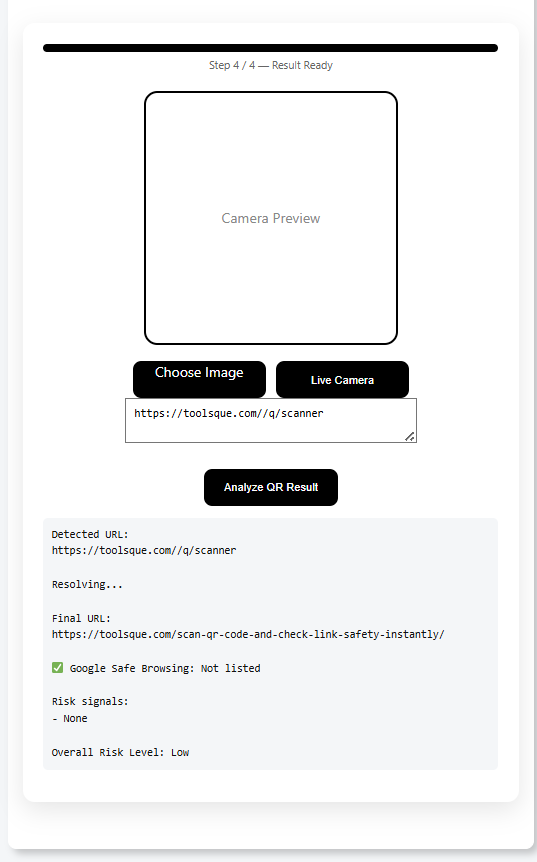
After creating your QR code, always test it before using it publicly or printing in bulk.
Open the short link directly in your browser or scan the QR code using the ToolsQue QR Scanner to confirm the redirect works correctly. Make sure it opens the correct destination page without errors.
If everything works as expected, your QR code is ready to use.
Change the Destination Anytime
If your destination page changes later, simply open your.htaccess file and replace the URL on the right side of the redirect line.
Save the file, and the same QR code will now send visitors to the new page. There’s no need to reprint anything.
Real Examples
This approach is useful in many real situations.
Updating restaurant menus when items or prices change
Changing event details like schedules or locations
Updating product information or instructions
Fixing broken or outdated links
Running new promotions without reprinting materials
Best Tips
Use short, simple names like menu or promo so links are easy to manage. Always test your links before printing in bulk to avoid mistakes. Keep your redirects organized so you can update them quickly later. It’s also smart to keep a backup of your.htaccess file in case you need to restore it.
When This Method Works Best
This setup is ideal when you want full control over your links and don’t want to rely on third-party platforms. It works especially well for printed materials where links may need to change over time. It’s also a good choice if you want a simple setup without ongoing subscription costs.
Limitations
You need access to your website hosting to edit the file. All links are managed manually, so updates require editing the file each time. There’s no built-in tracking unless you add analytics separately.
Simple Summary
This method lets you create QR links on your own website so you can change where they point anytime. It helps you avoid reprinting costs and keeps you in full control without depending on external tools.
If you want, I can now do a final pass to make the entire article tone perfectly consistent from top to bottom.
What is a dynamic QR link?
A dynamic QR link is a short link you control that redirects to your final page. You can change the destination anytime without changing the QR code itself.
How is this different from a regular QR code?
A regular (static) QR code points directly to a fixed page and cannot be changed later. A dynamic link lets you update the destination whenever needed.
Do I need to pay for a service to create dynamic QR links?
No. You can create your own dynamic links using your website, which means you don’t need subscriptions or third-party platforms.
Why would I want to create dynamic QR links myself?
Creating them yourself gives you full control, avoids monthly fees, and ensures your QR codes keep working as long as your website is active.
Can I change the destination after printing the QR code?
Yes. That’s the main benefit. You only update the redirect link on your website and the printed QR code continues to work.
Is this method safe to use long term?
Yes, as long as you maintain your website and keep your links active, your QR codes will continue to work reliably.
Who should use self-managed dynamic QR links?
This approach is useful for designers, small businesses, product packaging, event organizers, and anyone who prints QR codes but may need to update links later.
Do I need coding knowledge to set this up?
No advanced coding is required. You only need access to your hosting file manager and basic instructions to create the redirect link.
Can I still use a normal QR generator with this method?
Yes. You simply generate the QR code using your short link instead of the final page URL.
What happens if my website goes offline?
If your website is unavailable, the QR link will not redirect. Keeping your site active ensures your QR codes continue to work.
Is creating your own dynamic QR better than using online QR platforms?
It can be better if you want full control and no recurring costs. Online platforms are easier to start with, but self-managed links give you independence.
Related: static vs dynamic QR codes · track QR scans without a subscription · all QR code tools
What the Free Plans Actually Withhold
Most people search for a free dynamic QR code after hitting the same wall: the free tier covers everything except the one feature that makes a code dynamic, editing the destination after printing. Here is where the common options draw that line.
| Option | Free tier reality | The catch |
|---|---|---|
| Bitly free | Short links, capped number of new links per month | Editing a link's destination sits behind the paid plan |
| TinyURL free | Basic short links | No destination editing, the link is frozen at creation |
| Typical QR SaaS | 14 to 30 day trial with full features | Then roughly $5 to $15 a month, $60 to $180 a year, and printed codes stop resolving if you cancel (see do QR codes expire) |
| DIY redirect file | Unlimited links, edits, and scans | Needs hosting you control |
The cost math is short: $0 on hosting you already pay for, or about $3 a month for entry shared hosting bought only for this.
The WordPress Route: No .htaccess Needed
If your site runs WordPress, skip the file manager. The free Redirection plugin (2 million+ active installs) does the same job from wp-admin:
- Go to Plugins, then Add New, search for Redirection, install and activate.
- Open Tools, then Redirection, and run the short setup wizard.
- Click Add New. Source URL:
/q/menu. Target URL: your destination, for example a hosted menu PDF like the ones the QR code for PDF tool is built around. - Save, then generate your QR code from
yoursite.com/q/menu. - To change the destination later, edit the target in that same screen. The printed code never changes.
Bonus: the redirects table shows a Hits column, so you get a basic scan counter with zero setup.
Counting Scans for Free
On the .htaccess method you have two free counters. First, the access log: every scan of /q/menu writes one line your host already stores, something like 203.0.113.7 - - [20/Aug/2026:14:02:11 +0000] "GET /q/menu HTTP/1.1" 302. Open raw access logs in your hosting panel and filter for /q/.
Second, GA4. Tag the destination, not the short link: Redirect 302 /q/menu https://yoursite.com/menu/?utm_source=qr-menu-v2&utm_medium=qr. Then open Reports, then Acquisition, then Traffic acquisition, switch the table's first dimension to Session source / medium, and search for qr-menu-v2. Those scans get their own row, and a new tag per reprint lets you compare batches.
Three Things That Silently Break the File
- Using 301 instead of 302. Phones and browsers cache a 301 permanent redirect, sometimes for months, so old scanners keep opening the old destination even after you edit the file. A 302 is not cached by default, which is the whole reason this method uses it.
- Case. On Linux hosting
/q/Menuand/q/menuare different paths. Print lowercase, always. - Invisible characters. Pasting from chat apps or word processors can drag in trailing spaces or curly quotes, and one bad character in .htaccess can throw a 500 error for every URL it covers. Paste into the host's plain text editor. Also, plain
Redirect 302lines work withoutRewriteEngine On: that directive belongs to a different Apache module, and a file with only Redirect lines does not need it.
The Label Payoff: Short Links Print Smaller
The short link also keeps printed codes physically small. https://yoursite.com/q/menu is 27 characters and encodes as a version 2 or 3 QR code, 25 to 29 modules per side, which stays scannable at roughly 15 mm wide. A raw 90 character Docs or UTM link forces version 5 or 6, 37 to 41 modules, and that density wants 25 mm or more. For table and packaging stickers, build sheets with the QR code for labels generator, and if a dense code fails in the field, work through the QR code not scanning fixes before reprinting.