
PDF417 Generator and Reader: Free Barcode Maker and Decoder
Make a PDF417 barcode from text, a link or shipping data, or read one from a photo. Driver's license and boarding pass barcodes are explained field by field in plain words. PNG, HD and SVG downloads, all in your browser.
Built by Toolsque Team · last updated October 8, 2026 · checked against our testing process
1What goes in the code?
2Shape
3Print size and colours
How to make or read a PDF417 barcode
- To make one, type the text, numbers or link. Several lines are fine.
- Pick Standard, or Compact for a narrower code. Leave the width and the damage protection on Automatic unless your label needs a set shape.
- Set the width of the thinnest bar in millimetres. The tool shows the printed size, then download a PNG, an HD PNG or an SVG for label software.
- To read one, open Read a PDF417 and upload a photo, paste a screenshot or use your camera.
- For a driver's license or ID card, the result shows the name, date of birth with age, expiry date and address. For a boarding pass, it shows the flight, date, seat and booking code.
What is a PDF417 barcode?
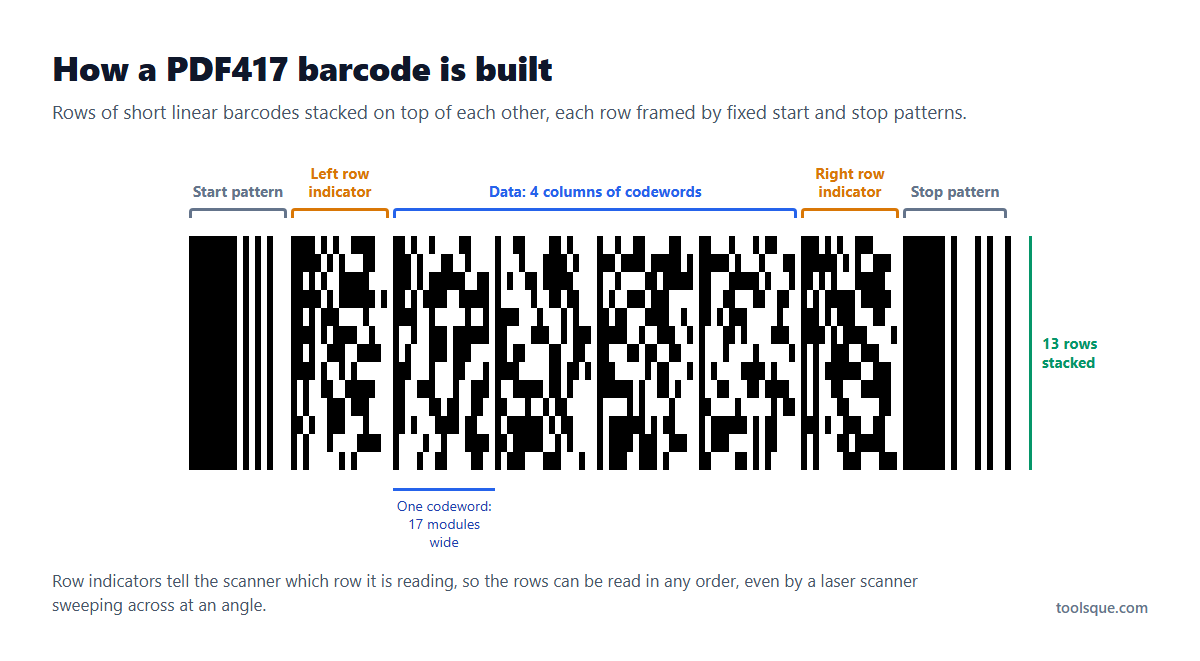
PDF417 is a stacked barcode: a pile of short linear barcodes, one on top of the other, that together hold far more than a normal barcode. The name means Portable Data File, and 417 describes each codeword: 4 bars and 4 spaces spread over 17 modules. It was created at Symbol Technologies in 1991 and is published as the ISO/IEC 15438 standard.
Every row starts and ends with fixed patterns and carries row indicators that tell the scanner which row it is reading. That is why a PDF417 can be read by a laser scanner sweeping across it at an angle, not only by a camera. Built-in error correction lets a scratched or partly torn code still read.
| Data type | Most in one PDF417 |
|---|---|
| Digits only | About 2,710 |
| Capital letters and digits | About 1,850 |
| Mixed text with lower case and punctuation | About 1,600 |
| Bytes (accents, other alphabets, binary data) | About 1,100 |
These limits are at the lowest damage protection. A code that big is very large in print, so most real PDF417 codes carry a few hundred characters.
Where PDF417 is used
- Driver's licenses and ID cards in the United States and Canada, in the AAMVA format, on the back of the card.
- Boarding passes, printed and on screen, in the IATA BCBP format.
- Shipping and freight labels, where one code can carry the whole address and parcel details.
- Tax and government forms that print a 2D barcode so the office can scan the data instead of typing it.
- Tickets, membership cards and inventory tags, wherever a long, narrow space needs to hold a lot of data.
How to read the barcode on a driver's license
Open Read a PDF417 above and photograph the wide barcode on the back of the card, close up, flat and in good light. The reader works out that it is a license barcode and lists what it holds in plain words: the name, the date of birth with the age and whether the holder is over 21, the expiry date and whether the card has expired, the license number and the address.
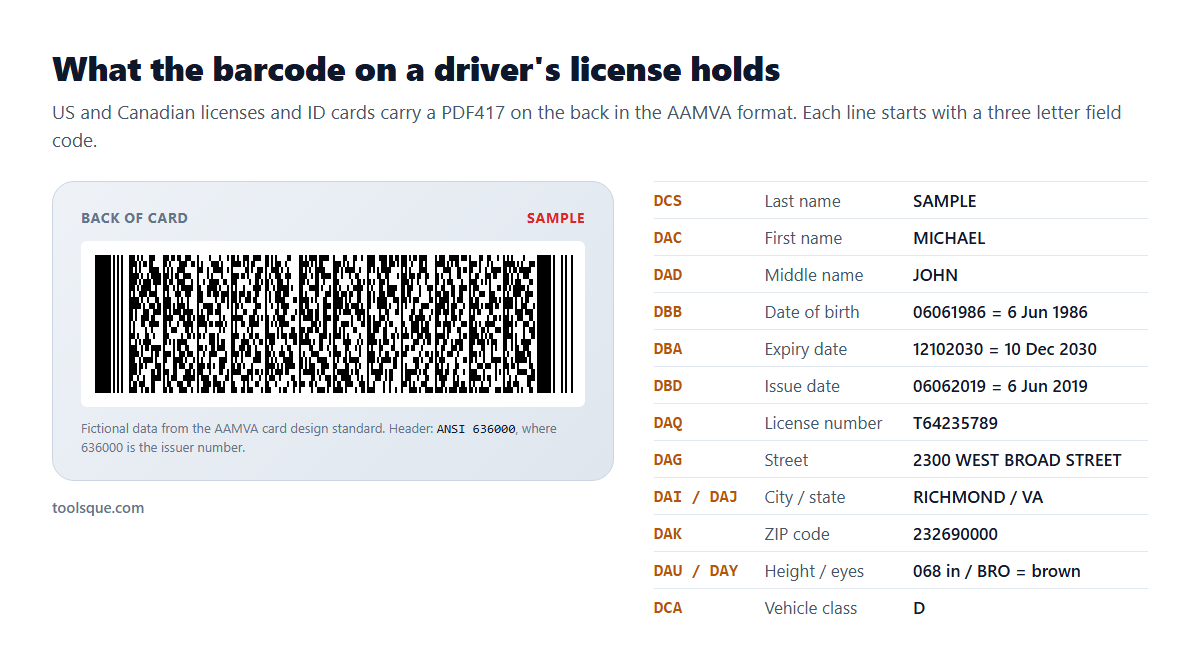
The data follows the AAMVA card design standard. It starts with @ and ANSI followed by a six digit issuer number that identifies the state or province, then a list of fields, each starting with a three letter code:
| Code | What it holds |
|---|---|
| DCS, DAC, DAD | Last name, first name, middle name |
| DBB | Date of birth |
| DBA, DBD | Expiry date and issue date |
| DAQ | License or ID number |
| DAG, DAI, DAJ, DAK | Street, city, state and ZIP or postal code |
| DBC, DAU, DAY, DAZ | Sex, height, eye color and hair color |
| DCA, DCB, DCD | Vehicle class, restrictions and endorsements |
| DDA | REAL ID compliance |
US cards write dates as month, day, year (06061986) and Canadian cards as year, month, day (19860606). The reader handles both. The barcode holds the printed details, not the photo.
What it cannot do: decoding the barcode does not prove a card is genuine. A forged card can carry a well-formed barcode, so compare the decoded details with the front of the card and follow your own ID check rules. Everything is read on your device and nothing is sent to a server.
What a boarding pass barcode contains
Airlines encode boarding passes in the IATA Bar Coded Boarding Pass (BCBP) format, printed as a PDF417 or shown in apps as an Aztec code. The reader here handles both. Upload a photo or a screenshot and it lists each flight: the airline and flight number, the route, the date, the seat, the cabin and the booking code.
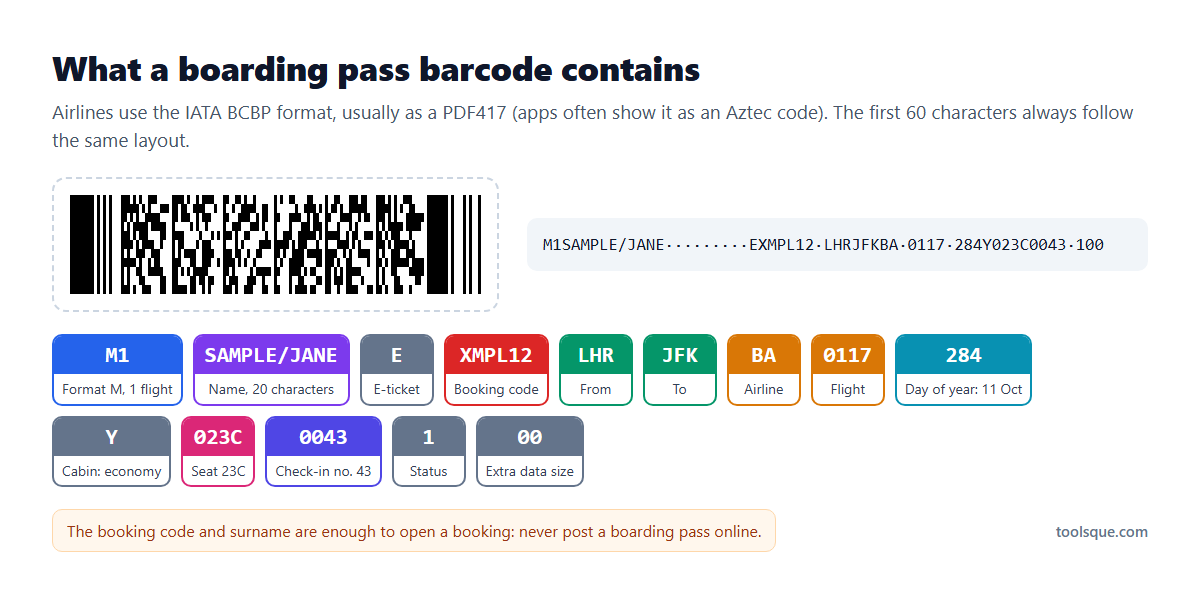
The date is stored as the day of the year, so 284 means 11 October in a normal year. The year itself is not in the barcode.
Do not post a boarding pass online. The booking code and your surname, both in the barcode, are enough for someone to open your booking, change your seat or cancel the trip. Blur the barcode too, not only the booking code printed on the pass.
PDF417 vs QR code vs Data Matrix
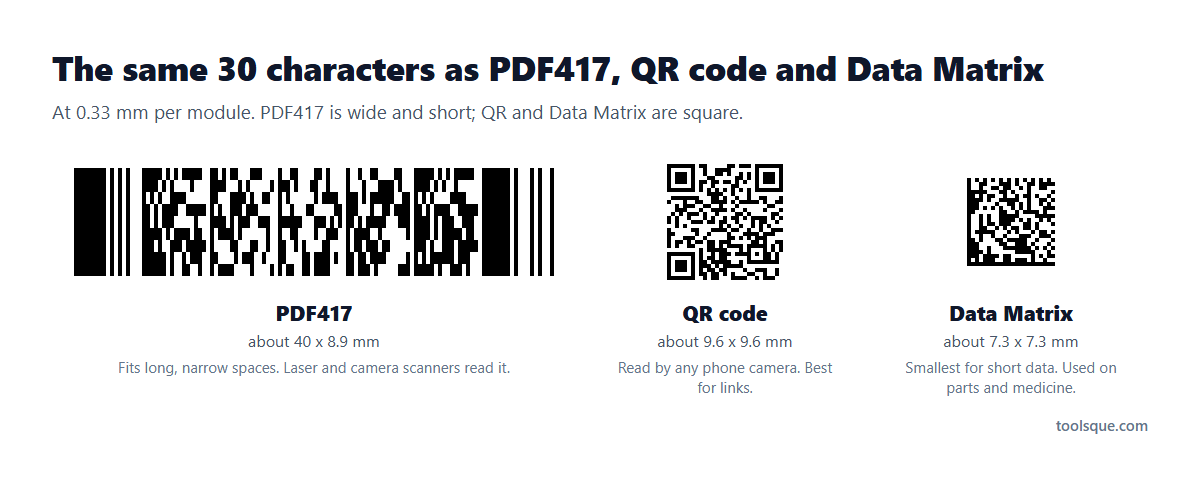
| PDF417 | QR code | Data Matrix | |
|---|---|---|---|
| Shape | Wide rectangle of stacked rows | Square | Square or rectangle |
| Laser scanners | Yes | No, camera only | No, camera only |
| Most data | 2,710 digits or 1,850 capitals and digits | 7,089 digits or 4,296 capitals and digits | 3,116 digits or 2,335 capitals and digits |
| Phone cameras | Read by scanning apps; many camera apps read only QR codes | Read by almost every phone camera | Read by scanning apps |
| Used on | IDs, boarding passes, shipping labels, forms | Links, payments, menus, marketing | Parts, electronics, medicine packs |
Choose PDF417 for a long, narrow space or when laser scanners must read it, a QR code for anything the public scans with a phone, and a Data Matrix for very small parts and packs.
Size and printing
The size of a PDF417 is set by the width of its thinnest bar, called the X dimension. Most scanners are happy with 0.33 mm, and a sharp printer can go down to about 0.25 mm. Each row is three times as tall as the thinnest bar, and the code needs a clear white border on every side. The tool shows the printed size in millimetres and inches as you type, and the SVG download carries that size, so it lands at the right size in label software.
Compact PDF417 (once called truncated PDF417) drops the right-hand row indicator and shrinks the stop pattern to a single bar, so it is narrower. It is a little less forgiving of damage, so use it when space is tight and the print is clean. More damage protection makes the code bigger but lets it survive scratches and creases.
Why this tool will not make license or boarding pass barcodes
The generator refuses data in the driver's license (AAMVA) and boarding pass (IATA) formats. Those barcodes belong to documents that only a licensing office or an airline should issue. To see how a reader or app handles them, use the samples in Read a PDF417, which come from the published standards and contain fictional data.
Related tools
For a regular retail or shipping barcode, use the barcode generator. To read other barcodes from a picture, try the online barcode scanner. For tiny 2D codes, see the Data Matrix generator and the Micro QR code generator.
Boarding pass in an airline app showing a square code instead of a PDF417? That is usually an Aztec code; the Aztec code reader explains it the same way, and reads European train tickets too.
Frequently Asked Questions
What is a PDF417 barcode?
A stacked 2D barcode made of rows of short linear barcodes. It holds up to about 1,850 letters and digits and is used on driver's licenses, boarding passes, shipping labels and forms. Laser scanners and cameras can both read it.
How do I read a PDF417 barcode?
Open Read a PDF417 above and upload a photo, paste a screenshot or use your camera. Take the photo close up and straight on. The text appears straight away, and license and boarding pass barcodes are split into named fields.
How do I scan the barcode on a driver's license?
Photograph the wide barcode on the back of the card and upload it in Read a PDF417. The reader shows the name, date of birth with age, expiry date, license number and address. It reads the data only; it does not prove the card is genuine.
Can I make a driver's license or ID barcode here?
No. The generator refuses driver's license, ID card and boarding pass data. It makes PDF417 codes for your own text, links, labels and forms.
What information is in a boarding pass barcode?
The passenger name, the booking code, the airports, the airline and flight number, the day of the year, the cabin, the seat and the check-in number. Because the booking code and surname are inside, never post a boarding pass online.
What does 417 mean in PDF417?
Each codeword, the unit that carries the data, is made of 4 bars and 4 spaces spread over 17 modules. PDF stands for Portable Data File.
What is the difference between PDF417 and a QR code?
PDF417 is a wide stack of rows that laser scanners can read; it is used on IDs, boarding passes and labels. A QR code is square, holds more data and is read by almost every phone camera, so it is better for links.
Is it free, and is anything uploaded?
It is free with no signup. Codes are made and read in your browser, so nothing you type or scan is sent to a server, and the downloads can be used commercially.