
Aztec Code Generator and Reader: Make or Decode Aztec Codes
Make an Aztec code from text or a link, or read one from a photo or screenshot. Train ticket and boarding pass codes are explained in plain words. PNG, HD and SVG downloads, all in your browser.
Built by Toolsque Team · last updated October 13, 2026 · checked against our testing process
1What goes in the code?
2Size and protection
3Print size and colours
How to make or read an Aztec code
- To make one, type the text, numbers or link. Several lines are fine.
- Leave the size on Smallest that fits, or pick Compact or Full range. Standard damage protection (23%) suits most uses; raise it for codes that get scratched or creased.
- Set the size of one square in millimetres. The tool shows the printed size, then download a PNG, an HD PNG or an SVG for print and label software.
- To read one, open Read an Aztec code and upload a photo, paste a screenshot or use your camera.
- For a train ticket, the result lists the name, route, class and valid dates with the ticket text. For a boarding pass, it shows the flight, date, seat and booking code.
What is an Aztec code?
An Aztec code is a square 2D barcode with a bullseye in the middle. The data sits in square rings around that bullseye, so a scanner finds the code from the centre out and the code needs no blank border around it. It was invented in 1995 by Andrew Longacre Jr. and Robert Hussey, is published as the ISO/IEC 24778 standard, and its patent was released to the public, so anyone can use it free.
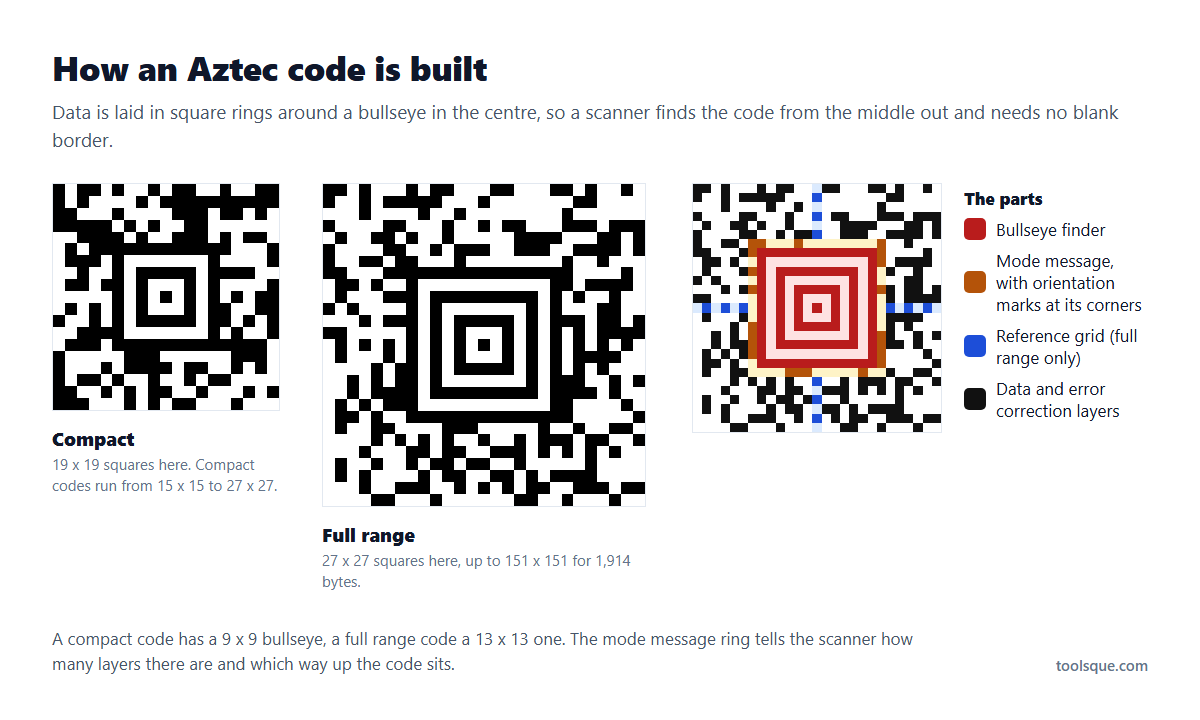
There are two sizes. Compact codes have a 9 x 9 bullseye and run from 15 x 15 to 27 x 27 squares, ideal for short text. Full range codes have a 13 x 13 bullseye and grow up to 151 x 151 squares. A tiny 11 x 11 version called Aztec rune holds a single number from 0 to 255.
| Data type | Most in one Aztec code (23% protection) |
|---|---|
| Digits only | 3,832 |
| Capital letters and digits | 3,067 |
| Bytes (accents, other alphabets, binary data) | 1,914 |
With less damage protection a code holds more, and with more it holds less. Codes this full are large, so most real Aztec codes carry a few hundred characters.
Is your square code an Aztec?
If you searched for a square code reader or a square code scanner and landed here, check the middle of your code before anything else. An Aztec code has a bullseye of concentric rings right in the centre and no large squares in the corners. That bullseye is the giveaway, and it is the reason a normal QR reader refuses to read it.
If instead you can see three big squares in three of the four corners, you are holding a QR code, not an Aztec. Use the QR code scanner for that. A square with a solid L shape down the left and along the bottom is a Data Matrix, and a wide block of stacked stripes is PDF417.
Aztec codes turn up in a small number of places, which is another clue: a train ticket, a boarding pass in an airline app, a car park or transit gate ticket. If your square code came from one of those, the reader on this page is the one you want.
Where Aztec codes are used
- Train tickets across Europe, including Deutsche Bahn and many other railways, and UK rail e-tickets.
- Boarding passes in airline apps, using the same IATA data as the PDF417 on printed passes.
- Event and public transport tickets, because an Aztec code reads well from a phone screen, even a cracked or dim one.
- Official documents, such as Polish vehicle registration certificates, where a small code holds a lot of data.
How to read the Aztec code on a train ticket
Open the Aztec Code Reader and upload a screenshot of the ticket from the app, or a straight photo of the printout. If the ticket follows the UIC 918.3 standard that many European railways use, the reader unpacks it and shows what it holds in plain words: the name, from and to, the class, the number of travellers, the valid dates, the ticket reference and when it was issued, plus the ticket text stored in the code.
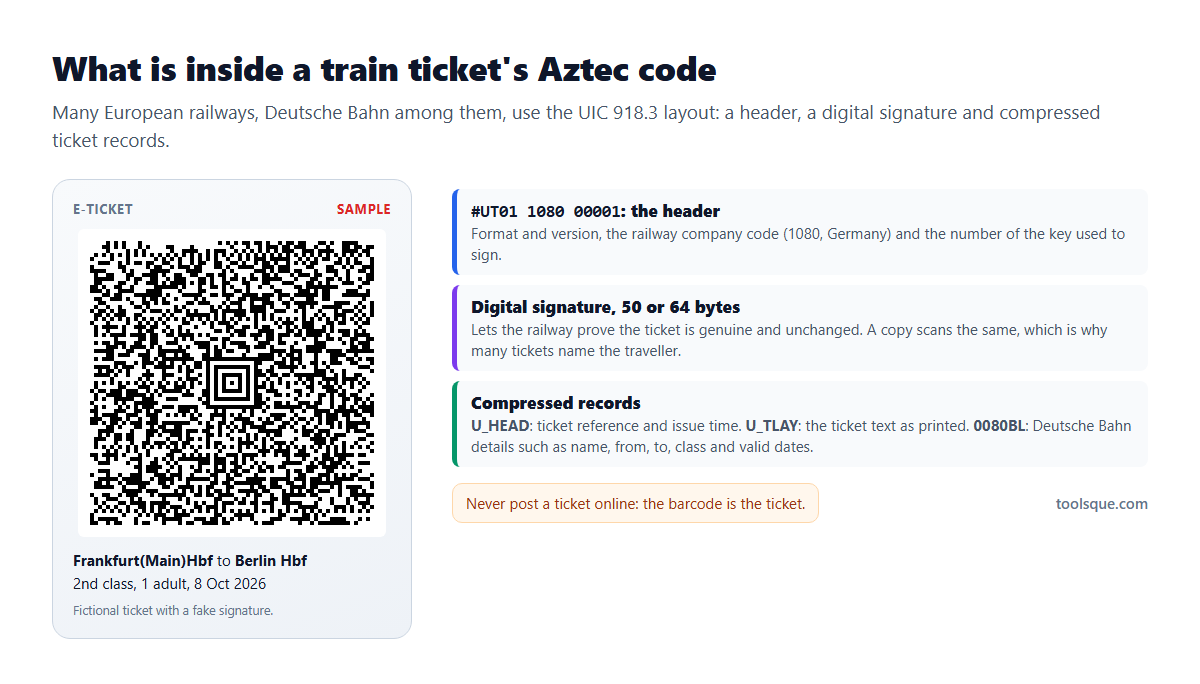
| Part | What it holds |
|---|---|
| Header (#UT01 or #UT02) | The format version, the railway company code and the number of the signing key |
| Digital signature | 50 or 64 bytes that let the railway prove the ticket is genuine and unchanged |
| U_HEAD | The ticket reference and the date and time it was issued |
| U_TLAY | The ticket text, laid out as it is printed |
| 0080BL | Deutsche Bahn details: name, from, to, class, travellers and valid dates |
What it cannot do: the reader shows the data but does not check the signature, which needs the railway's own key, so it cannot tell a genuine ticket from a forged one. Some tickets are encrypted, such as UK rail e-tickets and German local transport tickets in the VDV format, and only the operator can read what is inside; if the result is a jumble of letters or bytes, that is why. Everything is read on your device and nothing is sent to a server.
Boarding passes in airline apps
Mobile boarding passes often show an Aztec code instead of the PDF417 printed on paper passes, but the data inside is the same IATA format. The reader lists the airline and flight number, the route, the date, the seat, the cabin and the booking code. For printed passes and US driver's license barcodes, use the PDF417 reader.
Do not post a boarding pass or train ticket online. A boarding pass barcode holds your booking code and surname, which is enough for someone to open and change the booking, and a ticket barcode is the ticket itself.
Aztec code vs QR code
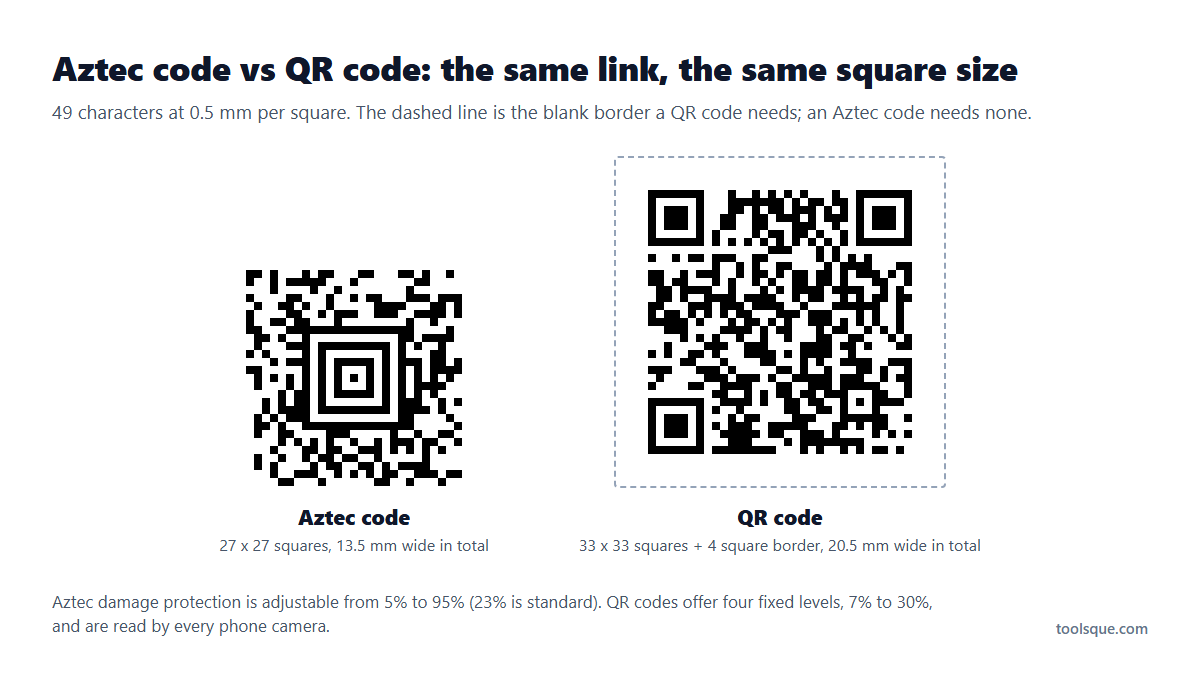
| Aztec code | QR code | |
|---|---|---|
| Finder pattern | One bullseye in the centre | Three large squares in the corners |
| Blank border | Not needed | 4 squares on every side |
| Damage protection | Adjustable from 5% to 95%, 23% is standard | Four fixed levels: 7%, 15%, 25% and 30% |
| Most data | 3,832 digits or 3,067 capitals and digits | 7,089 digits or 4,296 capitals and digits |
| Phone cameras | Read by scanning apps and this page; not every camera app | Read by almost every phone camera |
| Used on | Train tickets, boarding passes in apps, official documents | Links, payments, menus, marketing |
Choose an Aztec code for tickets shown on screens and for small spaces with no room for a border, and a QR code for anything the public scans with a phone camera.
Size and printing
For print, give each square at least 0.33 mm, or 0.5 mm and up on thermal labels and for phone cameras. Dark on light reads best. The code needs no blank border, but a thin white one helps when it sits on a coloured or busy background, so the tool adds two squares by default. On a screen, show the code at least 2.5 cm wide with the brightness up.
The SVG download carries the real print size in millimetres, so it lands at the right size in label and design software.
Why this tool will not make tickets or boarding passes
The generator refuses data in the rail ticket (UIC 918.3), boarding pass (IATA) and ID card formats. Those barcodes belong to documents only a railway, airline or licensing office should issue. To see how a reader handles them, use the samples in the Aztec Code Reader, which contain fictional data.
Related tools
For printed boarding passes and driver's license barcodes, use the PDF417 generator and reader. For tiny codes on parts and medicine packs, see the Data Matrix generator and the Micro QR code generator. To read other barcodes from a picture, try the online barcode scanner.
Frequently Asked Questions
What is an Aztec code?
A square 2D barcode with a bullseye in the centre and data in rings around it. It needs no blank border, reads well from phone screens and is used on train tickets, boarding passes in airline apps and official documents.
How do I read an Aztec code?
Open Read an Aztec code above and upload a photo, paste a screenshot or use your camera. The text appears straight away, and train tickets and boarding passes are split into named fields.
What is in the Aztec code on a train ticket?
For tickets in the UIC 918.3 format: the railway company code, a digital signature and compressed records with the ticket reference, issue time, name, route, class, travellers and valid dates, plus the ticket text.
Can it read a Deutsche Bahn ticket barcode?
Yes, Deutsche Bahn tickets use UIC 918.3, and the reader shows the name, route, class and valid dates. It does not check the digital signature, and it does not unpack the newer FCB data block that some tickets also carry.
What is the difference between an Aztec code and a QR code?
An Aztec code has one bullseye in the centre, needs no blank border and has adjustable damage protection from 5% to 95%. A QR code has three corner squares, needs a 4 square border, holds more data and is read by almost every phone camera.
Why do tickets use Aztec codes?
An Aztec code is small, needs no border and reads reliably from phone screens, even scratched or dim ones, and a scanner can find it at any angle from its centre bullseye.
Can I make a train ticket or boarding pass barcode here?
No. The generator refuses rail ticket, boarding pass and ID card data. It makes Aztec codes for your own text, links, event tickets and labels.
Is it free, and is anything uploaded?
It is free with no signup. Codes are made and read in your browser, so nothing you type or scan is sent to a server, and the downloads can be used commercially.
I have a square code with a circle in the middle. What is it?
That is an Aztec code, and the reader on this page will decode it. The ring pattern in the centre is what a decoder locks onto, in the same way a QR code uses the three large squares in its corners. Because the two look nothing alike to software, an ordinary QR scanner will not read an Aztec at all, which is usually why people end up searching for a square code reader.